Digital Clock for Global Time Zone Coordination: Professional Guide
In today's interconnected business landscape, coordinating across borders has become both essential and complex. As a global project manager, you are likely juggling meetings across continents every single day. You must track deadlines in multiple time zones and ensure your team stays synchronized despite massive geographical barriers. How can you manage several time zones without losing focus or making scheduling errors?
This guide provides practical strategies to master these challenges with precision. Global coordination requires more than just a calendar; it requires a reliable source of truth. By using a professional online digital clock, you can transform your approach to international scheduling. Whether you manage distributed teams in San Francisco, London, and Tokyo, or coordinate with partners in Singapore, these techniques will help you stay on track.
Navigating the world of international time management does not have to be stressful. With the right tools and strategies, you can turn time zone differences from a hurdle into a competitive advantage. Let’s explore how this platform serves as your central coordination hub for all professional timekeeping needs.
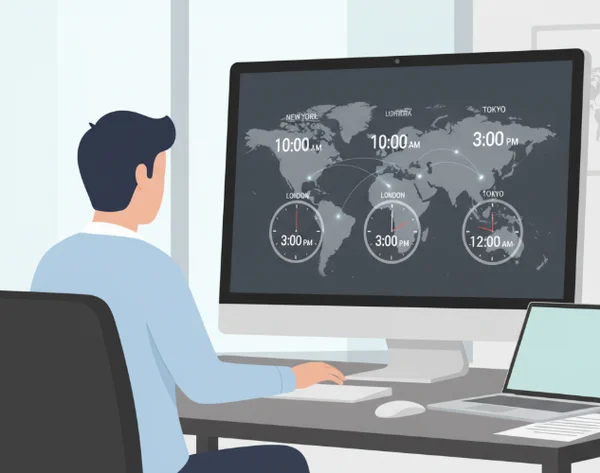
Understanding Time Zone Complexities in Global Business
To manage a global team effectively, you must first understand why timekeeping is so difficult in a corporate setting. It is not just about adding or subtracting hours. High-stakes business environments require extreme accuracy and an awareness of regional variations that can shift overnight.
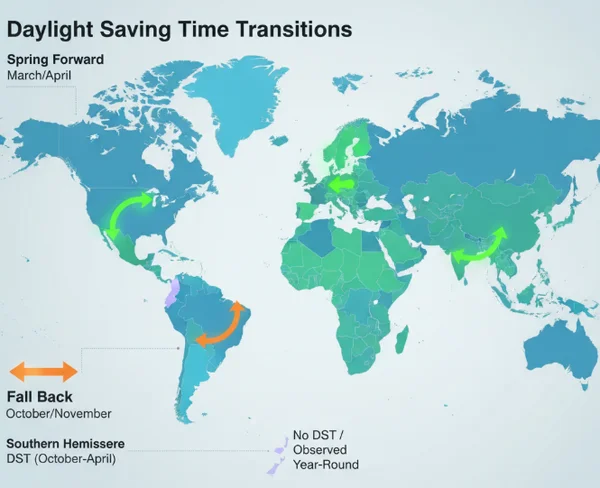
Daylight Saving Time Transitions and Their Impact
Daylight Saving Time (DST) is perhaps the biggest disruptor in global time zone coordination. Not every country observes DST, and those that do often change their clocks on different dates. For example, the United States typically shifts its clocks weeks before many European countries. This creates a "moving window" where the time difference between offices changes twice a year.
Missing these transitions can lead to missed board meetings or failed product launches. A precise time tool that syncs with atomic time servers ensures you are never caught off guard. When you rely on a clock that updates automatically based on global standards, you eliminate the risk of manual calculation errors during these tricky transition periods.
Historical Time Zone Changes and Business Implications
Time zones are not permanent. Governments occasionally change their standard offsets for economic or political reasons. Some regions might move from one time zone to another to better align with trading partners. For a global manager, these historical and administrative changes mean that standard offsets you memorized years ago might no longer be valid.
If your business relies on legacy software or local system clocks, you might be viewing outdated information. Professional coordination requires a realtime clock that stays updated with the latest international time standards. This level of reliability is crucial when you are managing legal deadlines or financial transactions that are time-sensitive.
Navigating International Meeting Scheduling Challenges
Scheduling a meeting for a team spread across three continents is a logistical puzzle. You have to find a "golden window" where everyone is awake and within reasonable working hours. Often, this means one team starts early while another stays late.
Without a clear visual reference, it is easy to accidentally book a meeting at 3:00 AM for your colleague in Berlin. Using a multi-timezone business clock allows you to visualize these gaps clearly. By seeing the exact time in every location simultaneously, you can make empathetic and efficient scheduling decisions that respect your team's work-life balance.
Multi-Timezone Clock Configuration Strategies
Once you understand the complexities, the next step is setting up your workspace for success. Your digital environment should act as a command center for time. A customizable interface allows you to keep the most important data points front and center.
Setting Up Primary and Secondary Time Zone Displays
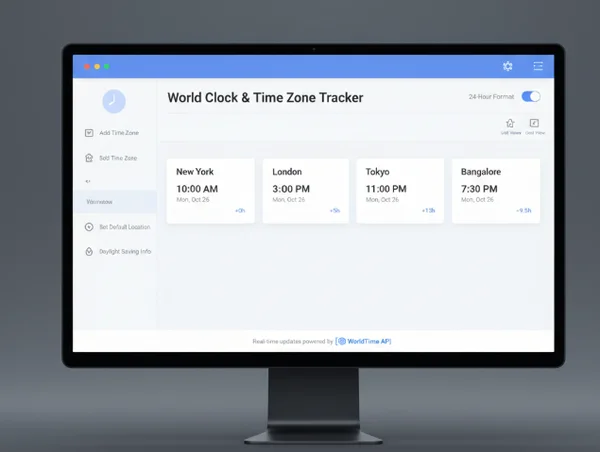
The foundation of a good workflow is having your primary local time and your most frequent secondary time zone visible at all times. If your headquarters is in New York but your main development team is in Bangalore, you need both times side-by-side.
You can customize your clock to show different formats. For example, a 24-hour display is often preferred in international business to avoid AM/PM confusion. Setting up these displays on a dedicated monitor or a pinned browser tab ensures that you never have to calculate the time in your head during a busy call.
Customizing Clock Views for Different Stakeholders
Different stakeholders have different needs. A designer might prefer an analog clock because it provides a visual representation of the slice of the day remaining. Meanwhile, a project manager might need a large, clear digital display with seconds to track the exact moment a high-frequency trading window opens or a server deployment begins.
Our platform allows you to toggle between digital and analog views with one click. This flexibility is vital when presenting to a group. If you are a professor or a team lead, using a full screen mode during a presentation ensures everyone in the room—or on the Zoom call—can see the countdown to a deadline.
Creating Time Zone Reference Boards for Team Collaboration
For large-scale projects, individual clocks aren't enough. You need a reference board. Many managers keep a dedicated World Clock dashboard open throughout the day. You can use the scaling features of an accurate clock to make the font larger or smaller, fitting multiple clock windows into a single organized grid on your desktop.
By standardizing the appearance of these clocks—perhaps using specific colors for different regions—you create a mental shortcut. Blue might represent the London office, while green represents Sydney. This visual coding speeds up your cognitive processing and reduces the time zone fatigue that many global workers experience.
Optimizing Global Workflows
Mastering time is about more than just looking at a clock; it is about integrating that data into your daily operations. Professional world time zone management involves aligning your project milestones with the reality of the sun's position across the globe.
Synchronizing Deadlines Across Multiple Time Zones
"End of Day" (EOD) is a dangerous term in global business. EOD in London is very different from EOD in Los Angeles. When setting deadlines, always define them in a universal format or provide the specific time for the receiving party.
Using a synchronized atomic clock ensures that when you say "17:00 UTC," everyone is looking at the exact same second. This precision prevents disputes over whether a submission was on time or late. For high-pressure environments like software releases or financial reporting, this nanosecond accuracy is the difference between success and failure.
Creating Time Zone-Aware Project Timelines
When building a project timeline, you must account for the hand-off periods. If a task moves from a team in New York to a team in Tokyo, there is a natural delay as one office closes and the other opens.
A smart manager uses a customizable clock tool to map out these transitions. By understanding exactly when your colleagues are logging on, you can time your communications so they are the first thing the team sees in the morning. This "follow the sun" workflow can effectively triple your productivity by keeping the project moving 24 hours a day.
Automating Time Zone Notifications for Team Members
While manual checking is important, automation is your friend. Use your digital clock to set reminders for when specific time zones are entering their core hours—the period where everyone is online at once.
If you know your window for a live meeting is only between 9:00 AM and 11:00 AM EST, use a clear digital display to monitor the countdown to that window. This keeps you focused on deep work until the exact moment global collaboration is required.
Professional Mastery of Time
Mastering global time zone coordination sets you apart as a professional leader who values precision and respects colleagues across the globe. By understanding DST nuances, configuring your workspace with a multi-timezone business clock, and optimizing hand-off workflows, you eliminate the chaos of cross-border scheduling.
DigitalClock.org provides the precision and customization you need to build your global command center. With atomic clock synchronization and a clutter-free interface, it is the most reliable tool for any global project manager. Are you ready to bring professional-grade accuracy to your daily schedule? Visit our site today and experience the clarity of a perfectly synchronized global workspace.
The Takeaway
How do I handle international meetings when team members are in vastly different time zones?
The best approach is to identify the "Golden Hours" where time zones overlap during standard working hours. If no overlap exists, consider rotating meeting times so that no single team is always inconvenienced. You can use an online digital clock to quickly check the current time in all participant locations before sending the invite.
What's the best way to communicate time zone differences to avoid scheduling errors?
Always include the time zone abbreviation (e.g., EST, GMT, JST) and consider providing a clear reference in the meeting invite. Using the 24-hour format is also highly recommended to avoid any confusion between 8:00 AM and 8:00 PM (20:00).
How can I track deadlines across multiple time zones?
You should customize your view to show exactly what you need. You can set up different clocks for each office location and adjust the colors for quick visual recognition. Using full screen modes during planning sessions can also keep everyone focused on the same master clock.
Are there any common pitfalls to avoid when managing global teams across time zones?
One major pitfall is assuming that everyone's local computer clock is accurate. Some systems drift by several minutes. Always encourage your team to use an accurate atomic clock as their primary reference to ensure everyone is perfectly in sync for deployments and meetings.
How does daylight saving time affect my global scheduling?
DST can change the offset between two countries by one or two hours overnight. The best way to prepare is to check a realtime clock tool the week of a transition. This ensures you are aware of the new time differences before your Monday morning meetings begin.