Enterprise Time Synchronization: NTP & Atomic Clock Solutions
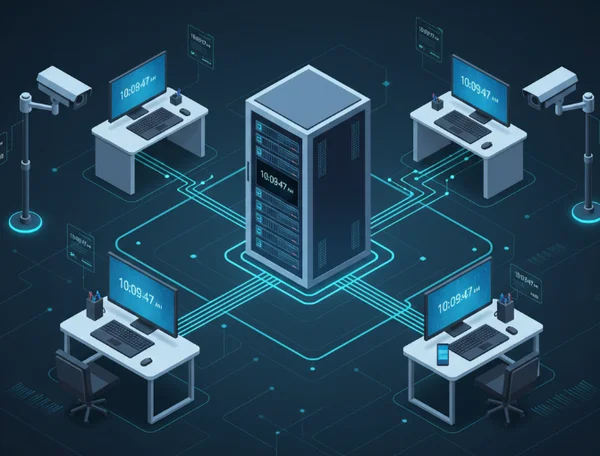
Clock discrepancies in enterprise networks are much more than a minor annoyance. In a professional setting, even a few seconds of drift can cause significant financial losses, corrupt sensitive data, and create massive security vulnerabilities. When your servers, workstations, and security cameras are not in sync, your entire digital infrastructure is at risk.
In today’s global business environment, nanoseconds matter. Whether you are managing high-frequency trading or simply coordinating a team across three continents, precision is your best friend. How can you ensure every device in your organization stays perfectly aligned? This guide explores how to implement robust time synchronization using Network Time Protocol (NTP) and the professional tools available via our precision timekeeping tool to maintain a seamless digital ecosystem.
How Atomic Clock Synchronization Secures Enterprise Networks
To build a reliable network, you must understand the technology that keeps it running. Most modern systems rely on the Network Time Protocol (NTP). This protocol is designed to synchronize the clocks of computers over a network. For an enterprise, relying on a local hardware clock is dangerous because hardware "drifts" due to temperature changes or aging components.
The Hidden Costs of Unsynchronized Network Time
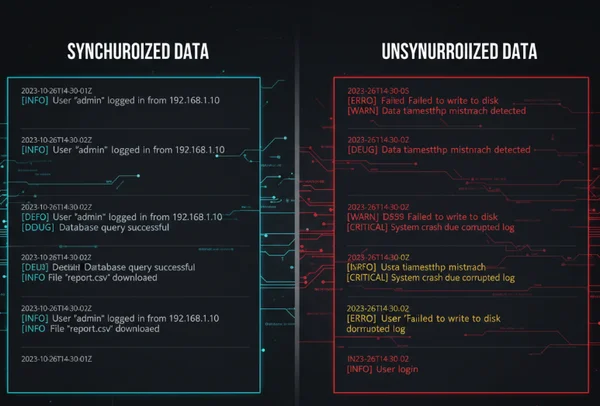
Out-of-sync clocks corrupt log files first. Conflicting timestamps between servers break forensic analysis during cyber-attacks. IT administrators use logs to troubleshoot errors and track security breaches, but if Server A records an event at 10:01:05 and Server B records the follow-up action at 10:01:02, your timeline is broken.
Beyond security, many industries face legal compliance requirements. Financial institutions and healthcare providers are often required by law to have accurate timestamps on every transaction or record. Failure to provide an accurate clock reading can lead to heavy fines or failed audits. Additionally, distributed databases rely on time to determine the order of data updates. If clocks are mismatched, the system might overwrite new data with old information, leading to permanent data loss.
NTP Protocol Fundamentals for Enterprise Networks
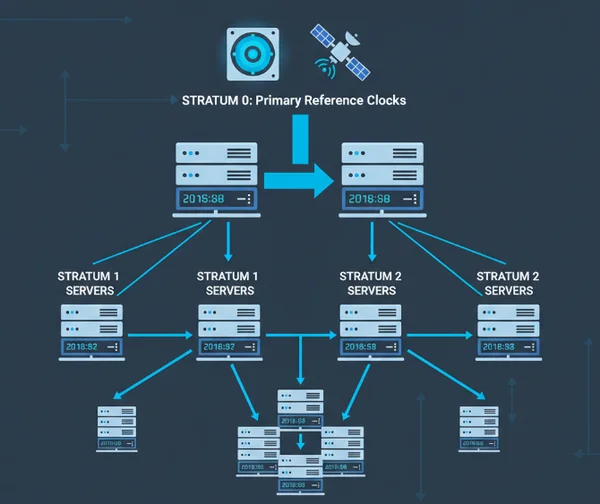
NTP works on a hierarchical system of "strata." Stratum 0 devices are the most accurate—these are high-precision timekeeping devices like atomic clocks or GPS clocks. Stratum 1 servers are directly connected to Stratum 0 devices. In an enterprise setting, your goal is to connect your network to a reliable Stratum 1 or Stratum 2 source.
By using an atomic clock sync method, your network pulls time from a source that is accurate to within a billionth of a second. This level of precision ensures that no matter how large your network grows, every machine follows the same "source of truth." This is why professional organizations prefer dedicated synchronization tools over basic system settings.
Step-by-Step NTP Server Configuration and Clock Sync Strategies
Setting up a professional time sync environment requires a methodical approach. You cannot simply point every computer to the internet and hope for the best. You need a centralized strategy that reduces traffic and increases reliability.
Setting Up Your Primary NTP Time Server
The best practice for a large organization is to set up an internal "Master" NTP server. This server will sync with an external atomic source and then provide that time to all other devices on the local network.
- Choose your source: Select at least three reliable external NTP pools.
- Configure the Master: On a Linux-based server, you would typically edit the
/etc/ntp.conffile. On Windows, you would use the W32TM tool via the command prompt. - Set the polling interval: Ensure the server checks the external source frequently enough to correct drift but not so often that it wastes bandwidth.
Using an atomic-synced display to verify your server's output is a great way to ensure your configuration is working as expected during the initial setup phase.
Firewall Configuration for NTP Traffic
NTP uses UDP port 123 to communicate. In many enterprise environments, this port is closed by default for security reasons. To allow time synchronization, you must create specific rules in your firewall.
It is vital to limit NTP traffic to known, trusted IP addresses. Do not open port 123 to the entire internet. Instead, allow outgoing requests from your Master NTP server to your chosen external Stratum 1 sources. Then, allow incoming requests from your internal workstations to your Master NTP server. This "hub and spoke" model keeps your internal network secure while ensuring everyone stays on schedule.
Implementing Redundancy with Multiple Time Sources
Never rely on a single time source. If that source goes offline or experiences a "leap second" error, your entire network could drift. The "Rule of Three" is a standard in IT:
- Source 1: A government-run atomic clock server (like NIST).
- Source 2: A university or research-based NTP pool.
- Source 3: A secondary commercial NTP provider.
By having multiple sources, the NTP software can use algorithms to detect if one source has become "insane" (providing incorrect time) and automatically switch to the more accurate ones.
Seamless Integration with DigitalClock.org's Timekeeping API
While back-end servers handle the technical synchronization, your employees need a visual way to stay aligned. This is where synchronized clocks for offices become essential. Integrating a unified visual time tool helps maintain a professional atmosphere and ensures everyone is literally "on the same page."
API Authentication and Initial Setup
For companies that want to build custom internal dashboards, our API provides a way to pull high-precision time data directly into your apps. This is particularly useful for internal "Command Center" displays or employee portals.
The setup is straightforward. Developers can request a sync with our servers, which are aligned with atomic time. This ensures that the clock displayed on a giant screen in your London office is identical to the one in your New York office, down to the millisecond. This level of customizable enterprise clock integration allows you to adjust fonts and colors to match your corporate branding, making the tool feel like a native part of your infrastructure.
Synchronizing Workstation Clocks Across Departments
Consistency across departments is key for project management. If the marketing team's clocks are two minutes fast and the engineering team is two minutes slow, meetings will always start late.
Adopt our free online clock as a company-wide reference. Managers use fullscreen mode for presentations; global teams leverage multi-timezone support without manual calculations. Because our tool supports multiple time zones, global project managers can easily toggle between different regions without having to perform manual mental math during calls.
Monitoring and Maintenance for Long-Term Synchronization
Configuration is not a "set it and forget it" task. Large networks are dynamic, and components can fail. Active monitoring is required to ensure your enterprise remains synchronized over months and years.
Implementing Time Synchronization Monitoring Alerts
You should treat time sync just like you treat server uptime. Use monitoring tools like Zabbix, Nagios, or PRTG to track the "offset" of your Master NTP server. If the offset exceeds a certain threshold—for example, 50 milliseconds—the system should send an automated alert to the IT department.
Proactive monitoring prevents small drifts from becoming large discrepancies. If you notice a specific department’s workstations are constantly drifting, it might indicate a hardware issue or a local firewall change that is blocking the NTP heartbeat.
Handling Daylight Saving Time Transitions in Enterprise Networks
Daylight Saving Time (DST) is a common cause of database errors and missed appointments. In an enterprise environment, you should never manually change the time on your servers.
Instead, ensure all servers are set to Coordinated Universal Time (UTC). Your NTP configuration will keep the UTC time accurate. The "change" for DST should only happen at the "Display Layer." This means the software the user sees—like their OS or a web-based clock—handles the conversion for their specific time zone. Our online tool handles these transitions automatically, ensuring that no matter what day of the year it is, the displayed time is correct for your selected region.
Your Enterprise Time Sync Implementation Checklist
A perfectly synced network isn’t just IT excellence—it’s your shield against data loss, audits, and workflow chaos. By moving away from unreliable local clocks and moving toward atomic-synced solutions, you eliminate a major point of failure in your business.
Implementation Summary:
- Identify the hidden risks of drift in your specific industry.
- Set up a multi-source NTP hierarchy with proper firewall rules.
- Provide a high-quality, visual time reference for your staff.
- Monitor your time offset to catch errors before they cause downtime.
Precision timekeeping is one click away. Explore our high-precision timekeeping tool to see how we keep global enterprises in sync. Whether you need a reliable way to test your accuracy or require a professional display for your office, we make precision simple.
The Takeaway
How does an enterprise network clock maintain atomic time accuracy?
Enterprise networks achieve this by connecting to Stratum 1 servers. These servers receive a direct signal from atomic clock sources via GPS or radio signals. The NTP software on your server then uses complex algorithms to account for network latency, ensuring the final time set on your machine is as close to the source as possible.
What are the best practices for NTP server configuration in a corporate environment?
The gold standard is to have at least three external time sources and one internal master server. You should always set your hardware and database clocks to UTC to avoid confusion during time zone shifts. Additionally, make sure to use a precision clock to visually verify the time across different departments to ensure the configuration is being applied correctly at the user level.
Can the API integrate with our existing identity management system?
While our tool is primarily designed for high-precision visual display and individual use, our web-based interface is compatible with any modern browser used in corporate environments. You can easily embed the fullscreen digital clock into internal dashboards or use it as a standalone reference point for employees who need to verify their workstation's accuracy.
What firewall ports need to be opened for NTP synchronization across subnets?
You must open UDP Port 123. It is important to remember that NTP does not use TCP. For maximum security, you should only allow this port to communicate with your internal Master NTP server rather than letting every single device access the open internet.
How do we ensure time synchronization compliance with industry regulations?
To meet strict regulations like FINRA or GDPR, you must maintain a "clock sync audit trail." This means logging how often your servers sync and what the maximum offset was at any given time. Using an accurate clock as a manual check during your weekly audits can provide an extra layer of human verification to your automated systems.