Fixing Online Clock Sync Errors for Business & Schools
When a critical business meeting starts late or classroom exam timing becomes unreliable, the culprit is often an overlooked one: clock synchronization errors. In our digitally connected world, even a few seconds of time discrepancy can cascade into significant productivity losses, compliance violations, or educational disruptions. Are you sure your organization's clocks are truly accurate?
Frustrated by meeting delays caused by inaccurate timekeeping? This guide shows you exactly how to diagnose and fix common online clock synchronization issues. We will cover practical troubleshooting techniques and real-world validation methods that you can implement immediately. For a dependable, zero-error time source, a tool like the one at DigitalClock.org offers a benchmark for atomic precision.
Understanding Time Synchronization Fundamentals
Let's start by understanding what actually causes these frustrating time discrepancies. Time synchronization is more than just setting a clock; it's a continuous process that keeps digital systems aligned. In professional settings, this alignment is not just a convenience—it's a necessity for operations, data integrity, and fairness. Schools and businesses alike depend on it for coordinated activities, from bell schedules to project deadlines.
How Clock Drifts Accumulate in Digital Systems
Every computer contains an internal crystal oscillator to keep time. However, these crystals aren't perfect. Due to tiny imperfections and environmental factors like temperature changes, they can "drift," either running slightly faster or slower than true time. This is an inherent limitation of most consumer and enterprise hardware.
Over hours, days, and weeks, this small drift accumulates. A clock that loses just one second daily will be nearly a minute off after two months. For businesses that require precise logging for financial transactions or security audits, this inaccuracy is unacceptable. It creates chaos in timestamped data and can lead to serious compliance issues. For more information about atomic clock precision, see our guide to timekeeping technology.
NTP Hierarchy Strata Explained: From Atomic Servers to Your Device
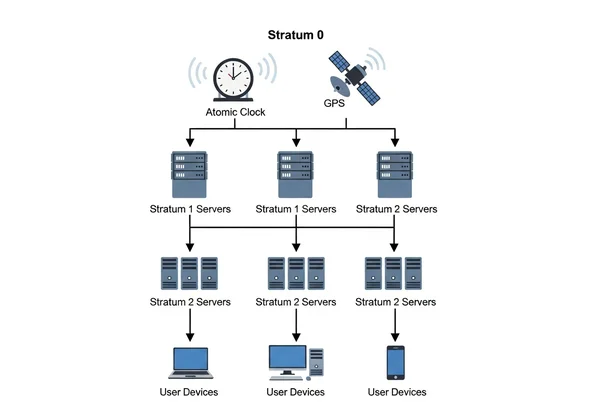
The Network Time Protocol (NTP) is the technology that solves the problem of clock drift. It creates a hierarchy of time sources, known as strata, ensuring that time information flows from the most accurate sources down to every connected device.
- Stratum 0: These are the most accurate time sources, like atomic clocks or GPS satellites. They are the ultimate reference for time.
- Stratum 1: These are computers directly connected to Stratum 0 devices. They act as primary time servers for the internet.
- Stratum 2: These servers get their time from Stratum 1 servers, creating the next layer of the time distribution network.
- Stratum 3 and beyond: Each subsequent stratum gets its time from the layer above it. Your computer or local network server is typically at Stratum 3 or 4.
The further your device is from a Stratum 1 server, the greater potential for delays and inaccuracies. That's why using a professionally managed online clock that syncs directly with low-strata servers is crucial for high-precision tasks.
Diagnosing Clock Synchronization Problems
Before jumping into solutions, let's first confirm whether you're really dealing with a synchronization issue. Spotting time discrepancies requires the right tools and knowing where to look. Ignoring these checks can lead to a false sense of security while operational risks grow silently in the background.
Tools and Methods for Detecting Clock Discrepancies
Identifying a clock sync error can be straightforward if you know how. Here are a few reliable methods to check your systems:
- Compare Against a Trusted Source: The simplest method is to open your local system clock and compare it against a known, highly accurate online clock. A reliable tool like the free online clock syncs with atomic time servers, providing an instant and trustworthy benchmark. If you see a difference of more than a second, you likely have a sync issue.
- Use Command-Line Tools: For IT managers, tools built into operating systems are powerful. On Windows, the
w32tm /query /statuscommand shows your device's current time source and last sync time. On macOS or Linux, thentpq -pcommand provides detailed information about the NTP servers your machine is connected to, including their stratum and offset. - Check Server Logs: In a business environment, inconsistent timestamps across different server logs are a major red flag for sync errors. This can corrupt data trails and make troubleshooting other IT issues nearly impossible, especially when reconstructing event timelines.
Common Sources of Workplace Clock Inaccuracy
Clock inaccuracies in a business or school setting often stem from a few common culprits. Understanding these helps you pinpoint the source of your problem faster and apply the correct fix.
- Firewall or Network Issues: NTP uses UDP port 123 to communicate. If a firewall is blocking this port, your devices cannot reach external time servers to sync. This is a very common configuration mistake on secured networks.
- Incorrect Time Server Configuration: Devices might be configured to sync with an unreliable or non-existent internal time server. This is common in networks that have been expanded or modified over time without updating the NTP settings.
- Overloaded Internal Time Servers: If too many devices on a large network are trying to sync with a single, underpowered internal server, it can fail to respond to requests, causing clients to drift. Load balancing across multiple servers is key.
- Relying on Local System Time: The most common error is simply trusting the default local system clock without verifying its sync status. This is especially risky in critical environments like examination halls or during live broadcasts. Try our customizable clock to experience professional-grade timekeeping firsthand.
Implementing NTP Best Practices for Business Environments
For any organization where time is a critical asset, implementing robust NTP practices is essential. This moves timekeeping from a passive setting to an actively managed part of your IT infrastructure, ensuring reliability and accuracy across the board. In an educational setting, this ensures fairness and consistency. Learn how to create the perfect classroom clock setup for educational environments.
Setting Up Enterprise Time Servers for Maximum Accuracy
For larger organizations, setting up a dedicated internal NTP server is a best practice. This server acts as the central time authority for your entire network, reducing external traffic and improving reliability.
The ideal setup involves configuring this internal server to synchronize with a pool of reliable, public Stratum 1 or Stratum 2 NTP servers. Then, all client devices on your network are configured to sync only with your internal server. This hierarchical approach insulates your network from internet latency issues and gives you a single point of control for time management. It ensures that every device, from servers to employee workstations, shares one unified, accurate source of time.

Why Accurate Time Matters
Accurate, synchronized time is the invisible foundation of a modern organization. It ensures that meeting schedules are respected, financial transactions are logged correctly, security systems operate in unison, and educational timelines are fair. By taking proactive steps to diagnose and fix synchronization errors, you protect your organization from inefficiency, compliance risks, and operational chaos. A reliable online clock and a solid NTP strategy are not just IT details; they are fundamental tools for success.